
Nexus Control Panel User Manual
The Nexus Control Panel at control.nexusdigital.com.au is where you manage everything in your Nexus Digital hosting account, from domain name records (DNS) and email accounts to the file manager, databases, SSL certificates and website security tools.
Unlike most web hosts, which use the off-the-shelf cPanel product, Nexus Digital Technology designs and develops its own control panel in-house. It runs seamlessly across our fleet of Australian Linux and Windows servers, so you get the same clean, simple interface whichever platform your website runs on. Because we built it, we can add features our customers actually ask for, such as one-click WordPress security scans, instant Secure Gateway IP unblocking and automatic MX presets for Google Mail and Office 365.
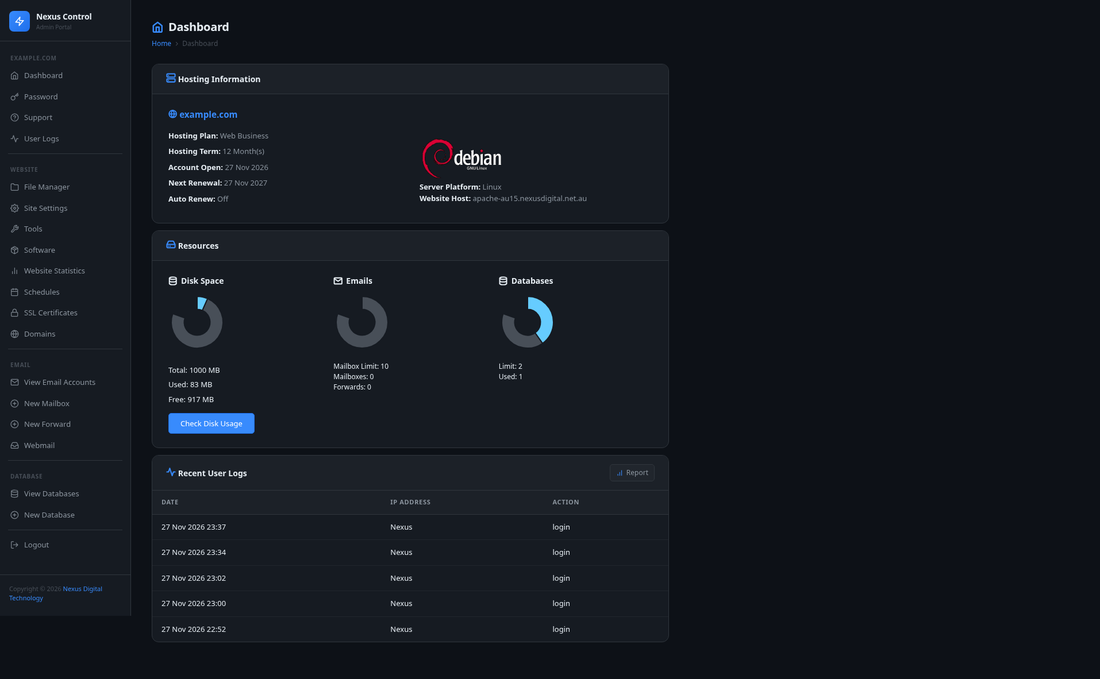
This user manual explains what every screen in the control panel is designed for and how to use it, with screenshots of the real interface. Choose a topic below to get started.
1Getting Started & Account
2Website Management
3Email Management
4Database Management
Quick reference
| Item | Details |
|---|---|
| Control Panel | https://control.nexusdigital.com.au/ |
| Control Panel username | Your primary domain name, e.g. example.com |
| Webmail | https://webmail.nexusdigital.com.au/ |
| Mail server (POP3 & SMTP) | mail.nexusdigital.net.au |
| Support phone | 1300 301 302 or (02) 9521 4052 |
| Support email | support@nexusdigital.com.au |
Frequently asked questions
What is the Nexus Control Panel?
The Nexus Control Panel is the online dashboard every Nexus Digital hosting customer uses to manage their hosting account, including DNS records, email accounts, files, databases, SSL certificates and website tools. It was built in-house by Nexus Digital Technology rather than using cPanel.
How do I log in to the Nexus Control Panel?
Go to https://control.nexusdigital.com.au/ and sign in with your primary domain name (for example example.com) as the username, along with your control panel password.
Is the Nexus Control Panel the same as cPanel?
No. Most hosts use the off-the-shelf cPanel product. Nexus Digital developed its own control panel that runs across our fleet of Australian Linux and Windows servers, so the same simple interface works no matter which platform your website is hosted on.
Can I install a free SSL certificate from the control panel?
Yes. Open SSL Certificates and click Install SSL Certificate to add a free Let's Encrypt certificate. It renews automatically every 90 days.
How do I create a new email account?
Choose New Mailbox from the Email section of the sidebar, enter the mailbox name and a strong password, then click Create Mailbox. You can then use it in Webmail or set it up in Outlook, iPhone or Mac Mail.
What should I do if I am locked out by the Secure Gateway?
Ask someone who can still access the control panel (or use a different internet connection) to open Tools, enter your public IPv4 address under Unblock IP Address on Secure Gateway and click Unblock IP. You can also call support on 1300 301 302.
Can't find what you need? Visit our Website Hosting Support page or contact our Sydney-based support team.

